Remote Authentication
CONFIGURE > USER MANAGEMENT > Remote Authentication
The OPERATIONS MANAGER supports three AAA systems:
-
LDAP (Active Directory and OpenLDAP)
-
RADIUS
-
TACACS+
To begin, select CONFIGURE > USER MANAGEMENT > Remote Authentication.
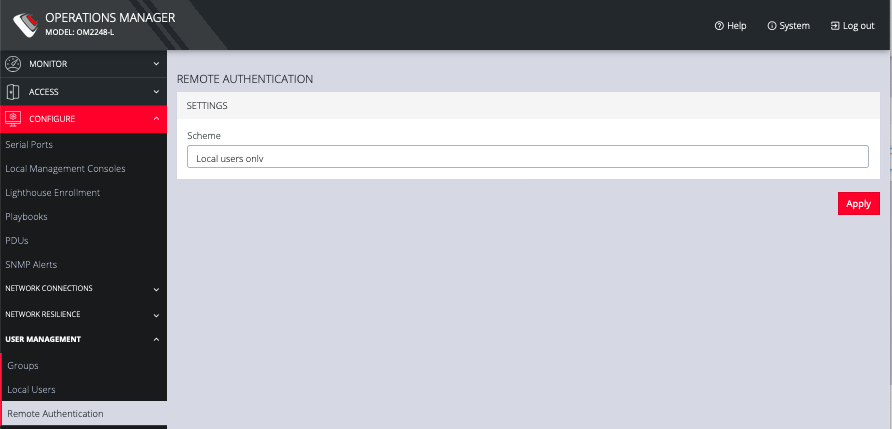
To configure LDAP authentication (for example):
-
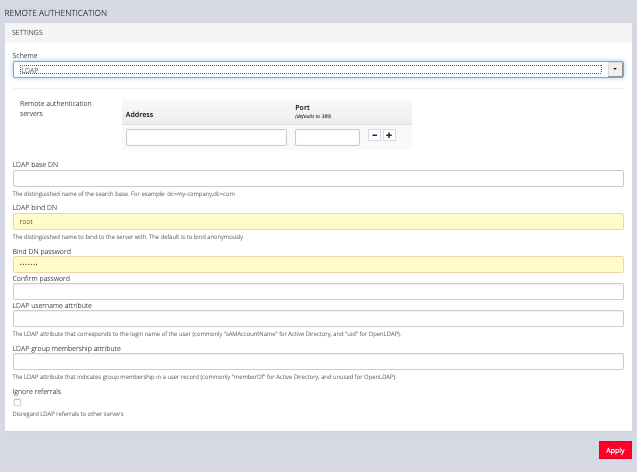
Under CONFIGURE > User Management > Remote Authentication, select LDAP from the Mode drop-down menu.
-
Add the Address and optionally the Port of the LDAP server to query.
-
Add the Base DN that corresponds to the LDAP system being queried.
For example, if a user’s distinguished name is cn=John Doe,dc=Users,dc=ACME,dc=com, the Base DN is dc=ACME,dc=com
-
Add the Bind DN. This is the distinguished name of a user with privileges on the LDAP system to perform the lookups required for retrieving the username of the users, and a list of the groups they are members of.
-
Add the password for the binding user.
-
Add the Username Attribute. This depends on the underlying LDAP system. Use sAMAccountName for Active Directory systems, and uid for OpenLDAP based systems.
-
Add the Group Membership Attribute. This is only needed for Active Directory and is generally memberOf.
-
If desired, check Ignore referrals option. When checked, LDAP will not follow referrals to other remote authentication servers when logging users in. If multiple remote authentication servers exist on the network, checking this option may improve log in times.
Note: Multiple servers can be added. The LDAP subsystem queries them in a round-robin fashion.
To configure RADIUS:
-
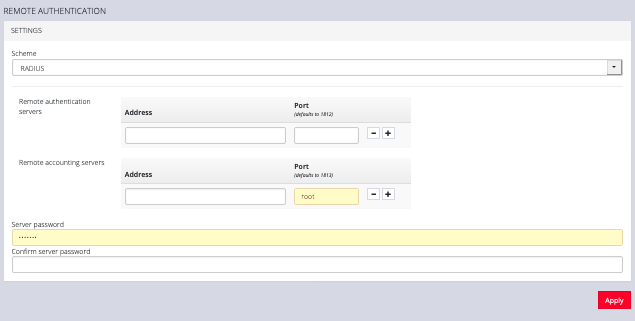
Under CONFIGURE > User Management > Remote Authentication, select RADIUS from the Scheme drop-down menu.
-
Add the Address and optionally the Port of the RADIUS authentication server to query.
-
Add the Address and optionally the Port of the RADIUS accounting server to send accounting information to.
-
Add and confirm the Server password, also known as the RADIUS Secret.
Note: Multiple servers can be added. The RADIUS subsystem queries them in a round-robin fashion.
To provide group membership, RADIUS needs to be configured to provide a list of group names via the Framed-Filter-Id attribute. The following configuration snippet shows how this can be configured for FreeRADIUS:
operator1 Auth-Type := System
Framed-Filter-ID = ":group_name=west_coast_admin,east_coast_user:"
Note: The Framed-Filter-ID attribute must be delimited by the colon character.
To configure TACACS+:
-
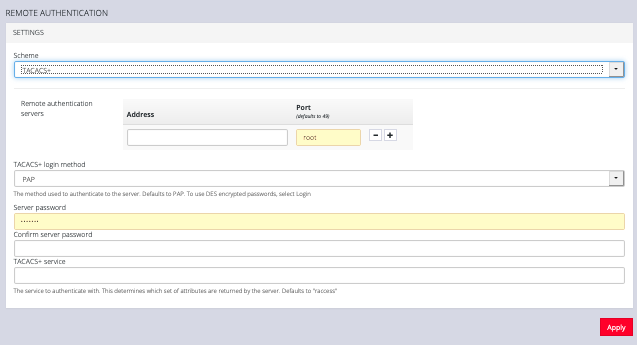
Under CONFIGURE > USER MANAGEMENT > Remote Authentication, select TACACS+ from the Scheme drop-down menu.
-
Add the Address and optionally the Port of the TACACS+ authentication server to query.
-
Select the Login Method. PAP is the default method. However, if the server uses DES-encrypted passwords, select Login.
-
Add and confirm the Server password, also known as the TACACS+ Secret.
-
Add the Service. This determines the set of attributes sent back by the TACACS+ server
Note: Multiple servers can be added. The TACACS+ subsystem queries them in a round-robin fashion.
user = operator1 {
service = raccess {
groupname = west_coast_admin,east_cost_user
}
}
To do this with Cisco ACS, see Setting up permissions with Cisco ACS 5 and TACACS+ on the Opengear Help Desk.